Who can I contact?
Canvas help is available any time with dedicated University of Melbourne 24/7 Canvas support channels, including online chat and phone.
Learning Environments can assist you with further enquiries regarding the LMS and other supported learning technologies. Simply submit a ServiceNow ticket and we will help you as soon as possible.
Guides and support resources
These resources will take you from getting started with the LMS and setting up your subjects, through to communicating with students and providing assessment tasks and feedback.
Training and workshops
Learning Environments provide an extensive set of workshops and resources to support staff teaching with the LMS. These are available to both teaching and professional staff and are designed to be practical and linked to your teaching needs.
Copyright
The following resources provide staff with advice and requirements regarding copyright for readings and other types of materials delivered in the LMS.
-
Readings Online
Readings Online enables staff to add, organise and control their subject readings and ensures copyright compliance in their subjects.
-
Copyright and the LMS
This page outlines the steps that you can take to ensure that the materials being used in a subject comply with the University's copyright requirements.
-
University Copyright Office
The University Copyright Office works with staff and students to maximise the permitted uses of copyright material for education and research.
LMS updates
What's been happening in the LMS? View the latest notable feature releases, updates and integrations that have been deployed in Canvas at the University of Melbourne, as well as known and resolved issues.
Request a new learning technology
You may request a new learning technology to be integrated with the LMS, or that a new tool be considered for central deployment. This is a two step process, and is outlined on the Privacy Impact Assessments for learning technologies page.
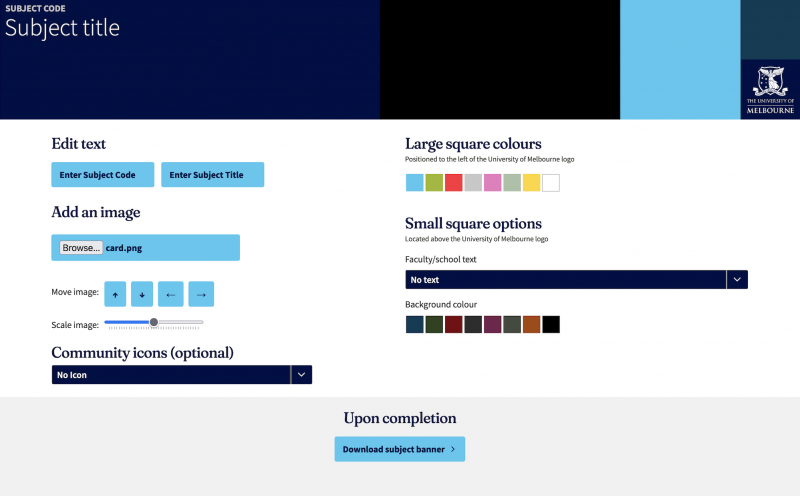
Create your own custom subject banner
Use our banner tool to create welcome banners that can be added to your LMS subjects and communities.
Where can I get LMS help?
Help is available any time with the University of Melbourne 24/7 Canvas support channels, including online chat and phone.
For all other student queries please contact Stop 1. Stop 1 can help you with admissions, enrolment, course planning, administration, support services, and skills and development.
I have a question about...
Most questions about using Canvas LMS are answered in the Canvas student guides. For unique University of Melbourne issues, we have answered some common questions below.
-
Who can I contact?
Canvas help is available any time with their dedicated 24/7 support channels, including online chat and phone.
For all other student queries, please contact Stop 1. Stop 1 can help you with admissions, enrolment, course planning, administration, support services, and skills and development.
-
I should have access to a subject or community but I can’t find it. What do I do?
First, contact Stop 1 or log in to my.unimelb to check your enrolment status. Once logged in to the Canvas LMS, your current subjects and communities will be displayed on your Dashboard.
To view all subjects and communities you are a part of, click on Subjects in the global navigation menu, then click All Subjects.
If you do not see your subject or community listed under All Subjects, contact Stop 1.
-
Can I customise my LMS notifications?
Yes! The LMS gives you control over how and when you are notified about updates in your subjects and communities.
Have a look at these Canvas LMS user guides to find out more:
- Set up email notification preferences in Canvas LMS
- Manage email notifications for each subject separately
- Set push notification preferences in your Canvas Student app for Android devices and iOS devices
-
Where can I find LMS user guides?
Canvas has provided a wealth of information in the Canvas Community. These guides will take you through accessing announcements, submitting assignments, getting the most out of your calendar and so much more.
The Student Getting Started Resources section is a great place to start.
-
Can I still access Blackboard LMS?
As of Semester 2, 2020, Blackboard was no longer used for teaching and learning at the University of Melbourne. This means that all teaching and learning is taking place in Canvas LMS.
From Monday 7 September 2020, students and staff can no longer access content in previously taught subjects and communities in Blackboard, nor access Blackboard file storage locations.
Find out more about this process in Blackboard LMS decommission - information for students.
Student user guides
Find all of our student user guides for LMS learning technologies here in the one place.
| Guide title | Description |
|---|---|
| Assignments | |
| Assessment literacy tool | The assessment literacy tool assesses your ability to provide feedback, and interpret and apply assessment criteria. |
| Assignments in the LMS | How to access, submit and download assignments in the LMS. |
| Converting images to PDF | How to scan your work on an iOS and Android device to submit your scans to an assignment from your computer, phone, or tablet. |
| Cadmus | |
| Cadmus | How to access, complete and submit a Cadmus assignment in the LMS. |
| LockDown Browser OEM (Cadmus) Exams | Cadmus uses a separate version of the Lockdown Browser, you may need to download even if you have already installed Lockdown Browser for a LMS Quiz Exam |
| Ed Discussion | |
| Quick start guide for students | Vendor guide. |
| Student guide to Ed Discussion | Vendor guide. Log in required. |
| FeedbackFruits | |
| FeedbackFruits for students | FeedbackFruits is a suite of learning and assessment tools that facilitate feedback and interaction. |
| Gradescope | |
| Gradescope | Gradescope is an online assessment platform that allows students to upload paper-based assignments for digital grading and feedback. |
| Converting images to PDF for Gradescope | How to scan your work on an iOS and Android device to submit your scans in Gradescope from your computer, phone, or tablet. |
| Submitting a group assignment through Gradescope | When submitting an assignment through Gradescope, you will be able to add group members to your uploaded assignment. |
| Submitting your PDF assignment via Canvas app | How to locate your PDF file and submit to Gradescope via the Canvas Student app on both iOS and Android devices. |
| Lecture Capture | |
| Getting started guide for students | Guide to accessing the Lecture Capture system as well as viewing and downloading recordings. |
| Q&A Discussions | The Lecture Capture Q&A feature allows staff and students to engage in discussions relating to recordings and presentations. |
| LockDown Browser | |
| Quiz LockDown Browser student guide | LockDown Browser is a web browser for taking quizzes in Canvas. It prevents going to another URL or accessing other applications during a quiz. |
| LockDown Browser OEM (Cadmus) Exams | Cadmus uses a separate version of the Lockdown Browser, you may need to download even if you have already installed Lockdown Browser for a LMS Quiz Exam |
| Microsoft Teams | |
| Getting started for students | Get started with Microsoft Teams by creating a shared workspace, or joining a Teams Meeting in the LMS. |
| Microsoft Teams Meetings | This guide explains how to use Microsoft Teams for online meetings from a desktop or laptop computer. |
| PebblePad | |
| PebblePad: The Basics | Use this guide to learn about Assets, Resources, uploading and sharing, and navigating PebblePad |
| Access PebblePad via Canvas LMS | Quick guide for students to access PebblePad, including videos to help with getting started with PebblePad. |
| PebblePad: Creating Assets | Refer to this guide if you need to use a workbook created by your instructor, or if you want to create a portfolio, blog or collection of Assets. |
| Create, edit and share blog posts | Use a PebblePad blog to reflect on your learning experiences, maximising your retention of knowledge and increasing your chances of academic success. |
| Embedding other learning technologies in PebblePad | This guide will cover embedding learning technology tools in PebblePad, including those offered by the University. |
| Linking your institutional University of Melbourne Google Drive to PebblePad | Follow the steps to link PebblePad and your student University of Melbourne Google Drive Gmail account. |
| Share your work in PebblePad | This guide will walk through the many options to share your assets in PebblePad. You may be required to share to collaborate with others, make your work publicly accessible and also for assessment to the ATLAS system for assignment grading by your teaching staff. |
| Submit your work in PebblePad | This guide will go through the process of sharing your PebblePad tasks to ATLAS for assessment. |
| Share with an external assessor | If your subject requires you to select an external assessor, such as a placement or internship supervisor, use this guide to share your work. |
| Create an alumni account | When you graduate or leave the University of Melbourne, you can create a free alumni account to continue collecting and sharing your accomplishments. |
| Poll Everywhere | |
| Poll Everywhere | Quick guide for students to access Poll Everywhere and respond to polls. |
| Turnitin | |
| Turnitin Similarity Reports | How to access, download and interpret the Turnitin Similarity Report. |
| Video | |
| Record, edit and upload videos for LMS Assignments | This guide provides some general advice and useful links to resources to help you get started with recording, editing and submitting a video or audio file as an assessment. |
| Submit a video in the LMS using EchoVideo | This guide steps through accessing an LMS assignment, uploading a video to your Lecture Capture (EchoVideo) library, then embedding it into the assignment submission. |
| Submitting media to a LMS discussion using EchoVideo Universal Capture | This guide steps through uploading media recorded with EchoVideo and submitting it to a Discussion in Canvas (LMS). |
| Submitting media to a LMS discussion using Kaltura | This guide steps through uploading media recorded with Kaltura and submitting it to a Discussion in Canvas (LMS). |
| Universal Capture | Universal Capture is a software that can be used to record and edit video content from your computer. It will automatically publish the captured content onto the Lecture Capture (EchoVideo) system which can then be submitted to an assignment or discussion. |
| Zoom | |
| Access, download and join Zoom | Zoom is a high-quality video and audio online conferencing tool. Staff can choose to enable Zoom in Canvas LMS subjects to host and facilitate webinars and other online sessions. |
| The Zoom interface | This guide explains the Zoom Meetings interface from a student perspective when using Zoom Meetings from a computer. |
| Student privacy | This guide outlines the privacy rights of students in Zoom meetings and recordings and situations where an audio and video presence may be required. |
Get the Canvas Student app
Canvas Student allows fast, convenient access to the Canvas LMS from your mobile device. Check information, access your materials, and interact with your subject or community on the go.

The LMS provides a platform for the use of a range of learning technologies.
The following tools and software are supported by Learning Environments.
Supported learning technologies
-
Ally - Accessibility tool
Ally is a tool that assesses the accessibility of your content on the LMS and provides guidance for improving its accessibility rating. Ally also has the ability to provide students with alternative formats of your LMS content.
-
Banner tool
The banner tool allows you to create custom banners that can be added to your LMS subjects.
-
Browser test tool
A simple tool for viewing your browser information, configuration, checking your internet speed, and managing third-party cookies.
-
Cadmus
Cadmus is an online assessment tool, where subject coordinators create and students complete written assessment tasks in a dedicated environment, accessed through the LMS.
-
Ed Discussion
Ed Discussion supports learning through rich and engaging discussion forums and chat rooms.
-
FeedbackFruits
FeedbackFruits provides a series of tools designed to enhance feedback and student engagement with course content.
-
Gradescope
Gradescope is an assessment tool that supports online submission, grading, and feedback. It is particularly relevant for STEM subjects and other areas that require hand written and hand drawn responses from students.
-
H5P
H5P is an easy-to-use tool that allows anyone to develop interactive online content, review activities, games, simulations and more. H5P items can be embedded into LMS pages or shared directly via a URL.
-
iThenticate
iThenticate is a similarity checking tool that identifies matching text in documents. Staff and graduate researchers can check their own writing and writing they have co-authored for matches against an extensive database.
-
Kaltura MediaSpace
MediaSpace is the University’s internal Video Management System solution. This media hosting and sharing platform will enable staff to upload media and create and curate collections of content for sharing and distributing within the organisation.
-
Kaltura VMS
Kaltura is a video management system (VMS) which can be used by staff to create videos and share with students directly through the LMS. Upload, manage, embed, and curate libraries of videos all within your LMS subject site.
-
Lecture Capture (EchoVideo)
The Lecture Capture system records lectures and events in supported venues. Recordings are made available to students as streaming video, via the LMS.
-
LockDown Browser
LockDown Browser is a custom browser that prevents students from accessing other applications during a Canvas quiz.
-
Microsoft Teams
Microsoft Teams is a software application that can be used to communicate and collaborate with others on a shared project or assignment.
-
Padlet
Padlet is an online tool that supports virtual brainstorming, collation and collaboration activities.
-
PebblePad
PebblePad is an ePortfolio platform used to develop digital portfolios (ePortfolios) and curate and manage evidence of reflection, learning, assessment and professional development.
-
Pedestal 3D
Pedestal 3D is a platform where registered users can upload 3D models for viewing, manipulation, and analysis by anyone. Hosted models can be embedded in LMS pages or shared through a URL.
-
Perusall
Perusall is a social eTextbook platform which allows students to collectively read, annotate and discuss the readings uploaded by teaching staff.
-
Poll Everywhere
The University of Melbourne provides staff premium access to Poll Everywhere, an online tool that allows users to create and collect responses to activities. Activities can be activated and distributed in a live session and through the LMS.
-
Qualtrics
The University of Melbourne provides all staff and research students with access to Qualtrics Research Core, a powerful survey engine that allows users to easily create, design and distribute surveys for a variety of teaching, learning and research needs.
-
Readings Online
Readings Online enables staff to add, organise and control their subject readings and ensures copyright compliance in their subjects.
-
Turnitin
Turnitin is a web-based text-matching software that works by comparing electronically submitted papers to billions of pages of content located on the Internet and proprietary databases as well as the work of other students whose papers have also been submitted into the system.
-
Zoom
Zoom is a high quality video and audio online conferencing tool for desktops and smartphones. It’s ideal for online classes, meetings, special events, webinars, remote working and job interviews.
Privacy Impact Assessments for learning technologies
A full list of completed learning technologies Privacy Impact Assessments (PIA) is available on the Privacy Impact Assessments for learning technologies page.
Request a new learning technology
You may request a new learning technology to be integrated with the LMS, or that a new tool be considered for central deployment. This is a two step process, and is outlined on the Privacy Impact Assessments for learning technologies page.